
Atari Text Format
Uploaded file:
Sprite Editor 1.2.doc
Size:
7030 Byte
Date:
2002
Language:
Country:
Release:
Version:
1.2
MD5:
6cfeffb50cbdd219745f401f695e84e4
Uploaded file:
Sprite Editor 1.2.txt
Size:
7194 Bytes
Date:
2002
Language:
Country:
Release:
Version:
1.2
MD5:
579a70a25deef20065781a48816b1431
Executable file (XEX)
Uploaded file:
Sprite Editor 1.2.xex
Size:
4158 Byte
Date:
2002
Language:
Country:
Release:
Version:
1.2
MD5:
93106bbe0621e1f8ef26dcb4309222e2
Sprite Editor 1.2
I. Introduction
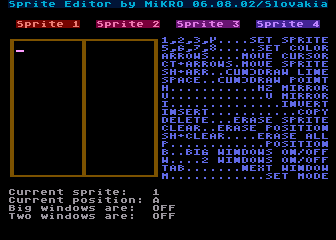
Sprite Editor (SE) is a little tool for making animated sprites with some new features. Main of them are: 26 positions, independent colors for each position, integrated editor & animator, nice design :) and (hopefuly) easy manipulation. You can quess why did I do it... Hm, why. Some months ago (october 2000) I became an idea to make a cool game for our little Atari, but I needed some tool just for making animated sprites. I found only one: Sprite Idon'tknow_what :) by Lufa/Satantronic which was ...uhm... very primitive (sorry ;-) So I started with coding THIS :) SE is ofcoz freeware!
II. Function overview
Editor:
No comment :)
UP/DOWN - select shade of sprite LEFT/RIGHT - select the color of sprite RETURN - confirm colors
No comment :)
Hold CONTROL and move cursor - you will move (rotate) the whole sprite
Hold SHIFT and move the cursor - you will draw a line
No comment :)
Mirrors the actual sprite by X-Axis. It's depend on 'Big Windows' settings (look at 'B' key)
Mirrors the actual sprite by Y-Axis
Inverts the actual sprite - $10 or $20 bytes long (look at 'B' key)
Copy the complete position ($20 bytes) incl. colors to the another one
Erase the actual sprite - $10 or $20 bytes (look at 'B' key)
Erase the complete position ($20 bytes). The colors will be preserved
Erase all positions and set the color of actual sprite to all positions
You can enter A-Z, 26 positions at all...
You can change the actual size of sprite - $10 (16) or $20 (32) bytes. So you can edit bigger sprites than can be on the screen (using CONTROL+UP/DOWN)
Here you can set 2 windows - it's useful when you need wider sprite than 8 bits. Of course you can have max. of 2 sprites in one window
Works only if 2 windows are active. In the 1st window you can use sprite 1 or 2, in 2nd window sprite 3 or 4
Exit to the Animator (the data & flags will be not changed... of course :)
No comment :)
You can type whole name of device (e.g. D1) or just first letter and press RETURN if number is OK
SE looks for PM.DAT and COL.DAT files in actual directory and loads them
Saves actual players and colors. In fact it's simple memory dump from $3800 to $44ff (PM.DAT) and from $3400 to $3467 (COL.DAT)
Note: sometimes, bcoz of bad synchronisation may be fonts and DLI after i/o operations corrupted. Simply go to Animator and back to Editor (M key) and nice design is back :-) I'm very sorry for this, but it's harder to fix it as you could think :-)
Animator:
Animator is 2nd part of my work. It's simplier than Editor, because it was coded during 3-4 days. Very nice feature is 'parallel' running - you can change speed, size, definition, etc during playing animation! I was very suprised when I found it ;-)
Now you can enter letters which represent the position. Maximum is 80, you can use DELETE. After typing press RETURN
Pressing 'R' you stop/run playing the animation. If you have set 2 windows, it will be detected and sprites 1/2 will be played next to 3/4
1 = positions are changed each Vertical Blank 2 = positions are changed each second Vertical Blank 3 = positions are changed each fourth Vertical Blank 4 = positions are changed each eighth Vertical Blank
It can be normal, double or quad
ON = corrects the shape of pixels (to be squares) OFF = classic Atari representation: 1 pixel is 1 scan line wide
ON = result of collision of sprite 1 and 2 or sprite 3 and 4 is 3rd color OFF = no collisions, sprite 1 has got the highest priority, sprite 4 the lowest
Exit to the Editor, animation is stopped
No comment :)
III. Hardware requirements
Nothing special - each 8-bit Atari (PAL/NTSC) with 48 kB of memory. Tested also under Atari800Win emulator...
IV. Sprites & colors in the memory
$3800: sprite 1, position A $3820: sprite 2, position A $3840: sprite 3, position A $3860: sprite 4, position A $3880: sprite 1, position B ... etc to $44FF
$3400: color of sprite 1, position A $3401: color of sprite 2, position A $3402: color of sprite 3, position A $3403: color of sprite 4, position A $3404: color of sprite 1, position B ... etc to $3467
It's very simple to make any routine for replaying... if you have any problems, contact me, OK?
V. Future plans
Game for Atari XE/F030 - with IMO very original idea, but it will be very hard to code... Probably for 320 kB and probably after Falcon version... Demo/intro/anythingforthe_scene for Atari XE/F030, especially Falcon !!!
VI. Contact
Bug reports, improvements, ideas, money :) send to:
Smail: Miro Kropacek Budatinska 23 Bratislava 851 05 Slovakia Europe ;-)
Email: mk20432@decef.elf.stuba.sk or mikro@atlantis.sk (only in emergency :)
VII. Greetings
Big hello goes to:
XI, Dodo, Lufa, Jookie of Satantronic Jiri Bernasek aka BEWESOFT Zdenek Burian of FLOP Radek Sterba aka RASTER Tiger of New Generation BLB of Cobra Lewis of Aids Vasco of Tristesse Dely of Atari Area Mad Butcher of F2 and all others who keep our Atari scene alive...
VIII. History
v1.0 [07/2001] - first official release
v1.1 [3.8.2001] - sprite animator fixed; options like size or correction are now unchanged after switching to editor
v1.2 [6.8.2002] - added save/load function. I was too lazy, but Raster and Mad Butcher kicked me to do it:-) Btw look at release date - 1 year after 1.1 version (in fact I didn't do ANYTHING on little XE... well, Falcon rulez more than XE :-)
I hope, you'll enjoy this little tool and wait for my next productions !
MiKRO, 6.8.2002, Bratislava/Slovakia
HardWare:
Operating system:
BASIC (ROM, embedded):