


atrutil.zip
Size
55254 Bytes
Date
1998
Language
Country
?
Release
Bit Depth
x32
OS
Windows
Version
1.13
MD5
9805f5f838c1b6a44cab0930a27d52a0
AtrUtil.txt
Size
26039 Byte
Date
1998
Language
Country
?
Release
Bit Depth
x32
OS
Windows
Version
1.13
MD5
a0444feb13d3e35131c484ed6a38c0d3
Bytes    Date       Time     File
------------------------------------------------
128512   1998-12-05 21:20:32 AtrUtil.exe
26039    1998-12-05 21:29:48 AtrUtil.txt
147      1998-12-05 21:28:20 ReadMe.txt
Atari 8-bit Disk Image Utility Ver 1.13
Copyright 1998 Ken Siders.
This program is freeware and may be freely distributed but
not sold.
Last update: December 5, 1998
Web page:
http://home.columbus.rr.com/ksiders/atari.htm
Mailto: atari@columbus.rr.com
What is it
AtrUtil is the ultimate utility for Windows 95 to handle ATR, XFD,
and DCM images. It can show the contents, extract files, delete
files, insert files, and view files from Mydos/AtariDos disks.
It can also create new blank disk images and even format them.
Also, you may view an image's or file'sproperties. Note: This
program is a Windows 95 Visual C/C++ learning project so there
may always be a few bugs lying around but I try to exterminate as
many as possible before each release. Suggestions are always welcome.
History
Version 1.13 12/04/98
(1) Bug Fix. Extracting or Viewing files that are a multiple of 512
bytes did not work correctly. Should now be fixed. If any problems
are found, let me know.
Version 1.12 11/18/98 (not released)
(1) Bug fix. Files inserted into an image should now have the correct
file size. To correct any existing ones inserted with AtrUtil,
extract the file to a temporary directory and reinsert it.
Version 1.11 11/08/98 (late)
(1) Locking and Unlocking Mydos and Atari Dos files has been added.
(2) Locked status is now indicated in the file list (with a *)
(3) Changed "About" screen.
Version 1.10 11/08/98 (early)
(1) Fixed bug handling files with no extension (again).
(2) Added experimental "Shrink" function which will shrink the size
of a Mydos disk down. All unused sectors at the end of the disk
will be removed. It does not remove unused VTOC sectors or blank
sectors in the middle of a disk left when files are deleted and
new files haven't overwritten them yet. Eventually, handling of
Non-DOS boot disks will be added which will remove empty sectors
at the end of the disk which should work for most disks. The minimum
size if 369 sectors which is the last directory sector.
Version 1.09 10/27/98
(1) Added Sort option. It will sort files in alphabetical order within
the image. Currently it only works with Mydos images (Larger
Mydos images that aren't compatable with AtariDos). There currently
is no provision to eliminate system files such as DOS.SYS, DUP.SYS,
etc.
Version 1.08 10/09/98
(1) Bug fix. With the introduction of SpartaDos support in 1.05 a
bug was introduced that would cause Atari Dos and Mydos images to
sometimes display no files or not all of the files. It has been
fixed.
Version 1.07 7/27/98
(1) Saving standard ATR images with 128 byte sectors works again.
Evidently no one has been using the program since I reversed the
definition of standard and non-standard ATR. This effected
the saving of KBOOT disks since they are always have 128 byte
sectors.
(2) Non-Dos and Non-KBoot disks now indicate they have an Unknown
Disk Format and don't display garbage in directory.
(3) File list is wider to accomodate future additions.
Hopefully in next version there will be a real Windows 95 style
directory selector and enchanced file list. I also hope to work
on subdirectory support.
Version 1.06
Internal - no release.
Version 1.05 7/27/98
(1) Limited SpartaDos support. Can identify SpartaDos disks and
display directories. No other functions are supported yet.
(2) Subdirectories should now be indicated with a + in the directory
entry. You can NOT tranverse subdirectories yet.
Version 1.03 6/11/98
Another Minor update
(1) Extrct Txt button is now enabled. It works like Extract but will
perform the same text conversions as view. Or simply ut will do
ATASCII to ASCII conversions, Atari Basic (and Turbo Basic XL)
to text, and binary to hexdump. If anything else got broken in
the process, let me know.
Version 1.02 6/03/98
Minor update
(1) Added more buttons and resized screen and rearranged buttons to
accomodate.
(2) When inserting files you may now insert as binary (inserts file
as is) or insert as text which converts carriage returns and
tab characters. It should (hopefully) recognize CR-LF, CR only,
or LF only text files and adjust appropriately. If you try to
insert a binary file in text mode you will end up with a really
messed-up file.
(3) Unlock/Lock, View As, Extrct Txt buttons as well as the Help
button are currently non-functional
Version 1.01 6/01/98
(1) Large files (too big for notepad) can now be viewed in Wordpad.
(2) Busy cursor is displayed for Create new image
Version 1.00 6/01/98
(1) Format disk option now active. The Create button will change
to a Format button when an image is open, and back to a Create
button when an image is closed.
(2) File name/location now is properly updated at top of screen and
on properties screen when saving to a different file.
(3) Changed icon. Added Icons for ATR, XFD, and DCM that can be used
for files. You must still register file types manually if desired.
(4) Busy cursor is displayed for Open, Close, and Format Image
operations. I still need to add it for Create Image (I forgot) and
possible some of the file operations.
Version 0.95 5/21/98
(1) Rename button is now functional
(2) Ability to create minimumally sized bootable atr from and Atari
8-bit executable. (called KBOOT image)
(3) Original file can be extracted back from or viewed from (2)
(4) Format Atari Dos Image button disabled (On Create Image screen.)
It would only be needed for DOS 2.5 Enhanced Density images since
Mydos disks are more or less compatable with Atari Dos 2.0.
(5) Images created by (2) are recognized on the directory box and
Image Properties box.
(6) Disabled a couple buttons on the main screen when image is closed
that weren't being disabled when they were supposed to be
Version 0.91 5/14/98
(1) Files can be saved in a few more formats (but NOT dcm yet)
(2) Added Save As button. Save and Save As currently both function
as Save As.
(3) Added Rename button but it is non functional so far.
(4) Probably a few minor details or bug fixes I have forgotten.
Version 0.90 05/07/98
(1) Misc bug fixes. Due to various problems with low level routines
I had to rewrite a bit of existing code. Hopefully no new bugs
will be instroduced.
(2) You may now select multiple files to insert. They may or may not
have been occasional problems with file insertion in the last version
but hopefully there are none now.
(3) When creating an image you can format it. You should really only
choose MyDos format (although Atari is Ok for SD 720K but it is the
same as MyDos anyways). Creating a Dos 2.5 Enhanced Density disk
will not work properly.
(4) You can no longer insert a file into a Dos 2.5 Enhanced Density image.
I had to rewrite a lot of stuff and didn't get this implemented yet.
The only thing you can safely do with Dos 2.5 Enhanced Density images
is extract file. You can select properties and if there are 1040 total
sectors and Dos type is Atari Dos it is an Enhanced Density Dos 2.5
disk.
(5) Added file properties. Not 100% complete yet but you can see the file
size in bytes.
(6) Files with more than 255 sectors display sector count properly now.
Version 0.81 04/22/98
Bug fixes:
(1) Number of VTOC sectors on disk should now be correct. I spent
a while looking at the Mydos source and formatting images with
XL-IT and I think I finally figured it out.
(2) VTOC handling should now work properly for double density
images. Inserting files in a double density image should work.
(3) Inserting files into images over 720 sectors should now never
produce a locked file.
Please note that currently AtrUtil ignores the locked file status and
always produces non-locked files.
Started adding file properties but nothing works correctly yet.
Version 0.8 04/16/98
Fixed bugs in sector calculations for larger than normal images.
VTOC was begin read wrong and number of sectors for it was being
determined wrong. (anyone know what byte 0 of sector 360 on Mydos
disks is?? My orignal assumption was wrong)
You may now insert files into images. This is new and there still
may be some bugs and I would appreciate any feedback on how it works.
Note: Atari and MyDos limits you to 64 files. Attempting to insert
a 65th will give an error even if there is lots of space left.
Inserting files into Dos 2.5 Enhanced Density images is not supported
yet.
Version 0.7 04/09/98
Big Mydos disk images are now properly recognized as Mydos.
Potential problem of extracting/viewing files with no extension
fixed.
Dos 2.5 Enhanced Density Support. You may now extract and view
files that are in the extended sectors.
You may now delete files from an image. This should even work
for Atari Dos 2.5 enhanced density images as well as Mydos.
This is has been tested some but not thoroughly. Let me know of any
problems please.
On Image Properties, some more info displays. This is mostly for
debugging purposes. Hopefully all of the VTOC routines work ok
so adding files to images should be added really soon. I had hoped
to have had it added this time but I spent a lot of time Hex viewing
mega Mydos images and Dos 2.5 Enhanced Density images to figure them
out. If any of the addition information on Image Properties seems
out of whack let me know. The free sectors here is from counting
bits in the VTOC and is independant of the DOS count although they
should always agree unless something is wrong with the disk.
Version 0.6 3/30/98
Image Properties will now tell you the original image type.
The following only involves double density (256 byte sectors):
Corrected code to recognize the original SIO2PC double density
images (also used by XLIT and other emultors). APE/XFormer
ATR double density images can also be read correctly but
currently only standard ATR images can be saved. Since SIO2PC
was the first program to create the ATR format (I believe -
correct me if I am wrong), I will consider it the official
format. The ability to save the other ATR type will be added
later. XFormer established the XFD format and I am have problems
with Imagic (from the creater of APE) to handle them. The main
discrepency is the number of bytes for the first three sectors.
Sio2Pc/XLit seems to store 256 bytes for each of the first three
sectors where APE and Xformer only store 128. XFormer seems to
store 256 bytes for the first three sectors of an XFD image, but
Imagic can't handle them. Any comments???? I will probably add
capability to read nonstandard XFD's in the next release as well
as write non-standard ATRs and XFDs in the next release.
Version 0.5 3/26/98
Program is now smarter at recognizing Mydos and Atari Dos
disks. Mydos Enhanced density disks now can have their
files viewed and extracted.
Priliminary DCM reading support. It may not work on all
images yet, especially double density (256 bytes/sector)
images.
Added minimize button to main screen.
Added 16x16 icon and fixed transparency problems with the
existing 32x32 icon.
Version 0.4
A new version in only one day!. Added Turbo Basic XL tokens
to BASIC viewing - don't know if more needs to be done or
not.
Added ability to read XFD files. Currently 3 size are
supported SSSD, SSED, SSDD. I don't know if there are more
legal sizes or not. You cannot save XFD's yet. DCM support
still needs to be added.
Save option is now enabled whenever an image is loaded. You
can now load an XFD images and save it as an ATR image.
Save always presents a file selection dialog box now.
Version 0.3
Extracting work for real this time - I promise. The last
version was loosing some bytes here an there.
You may view files (via notepad or wordpad). Files with a
BAS extension are even detokenized and displayed as text
(this is new - let me know of any problems). Other
extensions like COM, EXE, BIN, OBJ, etc. display as a hex
dump. Other files display as text. Note: Currently
reverse video displays as normal and special characters
display as periods. Anyone got an ATASCII font???
The program now remembers the last "Open" directory and
"Extract to" directory and will default to them.
Version 0.2
Please note I have only spent a few hours with this update
even though a month has went by. I hope to add updates more
frequently now.
When you open a file a temporary copy is made. This will be
important later when you can add files to an image so the
changes won't be permanent until they are saved. For this
reason, opening really large images may take a few seconds
now.
You can now Save Images. The Save button is only active if
there are changes made to the image. Currently "Create" and
"Insert" are the only options that will make a change.
"Insert" is not implemented yet so it doesn't actually make
a real change though. Note "Save As" will be added later
on.
You may now create new images! The "Create" button will
only be active if you do not currently have an image open.
You can pick one of three size or create your own. In the
future it will be added to automatically allow formatting of
an image in MyDos format so you can immediately add files to
the image. Note: for really large images creating an image
may take a few seconds.
If you associate ATR file extension with the program, double
clicking an ATR file will now launch it in AtrUtil. An
instant way to see the contents of an ATR file. You can
even launch multiple instances at once - Yipee.
Version 0.1
Initial version just supporting Viewing the directory and
extracting files.
To Do
This is a list of features I plan on adding to am thing
about adding. Suggestions and information are always
welcome. These are in no particular order.
. Fix any problems with reading DCM images. (if you have any let me know)
. Add support for saving DCM images.
. Ability to View other file types: Mac/65, Picture files,
fonts...
. More SpartaDos format handling. Let me know of existing problems.
. Image Properties button will allow changing some
attributes, especially locked status.
. Other ideas such as Defrag an image, expand to standard, etc.
. Subdirectory support. (what the 3 blank buttons might be used for)
. Read an Atari 8-bit Double Density Disk directly in drive a: or b:.
. Update DOS based utilities to use new image handling code.
. Real Win95 style directory selector.
. Other ideas?
Highest priority: Subdirectory support, Locking/Unlocking files, More
SpartaDos Support, Shrink to Fit.
Information
The Atari 8-bit Disk Image Utility (ATRUTIL for short
currently) allows one currently to view information, view
the DOS directory, or extract files from an ATR/XFD/ and DCM
image. It also allows one to create ATR disk images of any
standard or non-standard size. Hopefully DCM and XFD write
support as well as many more functions will be added to make
it the all in one Atari disk image utility.
This program runs in Windows 95 and should run under Windows
NT. This is intended primarily as a test version to get any
feedback or requests for features. Send any feedback to
ken_siders@compuserve.com or cp576@cleveland.freenet.edu.
Installation
There is no fancy installation utility with this program
yet; come to think of it there isn't any intallation program
yet. Just copy ATRUTIL.EXE where you want it and create a
short cut to it. You also can run it from a dos command
window within windows. The program also requires MFC40.DLL
and MSVCRT40.DLL. You may also download these files from my
page if they are not already on your PC. Gee, don't you
wish there was an install program. Check your
\WINDOWS\SYSTEM directory file for these file, if they are
not there, download the zip and extract them there. To
uninstall, guess how -- Just delete any files you added.
You may now associate an ATR/DCM/XFD extension with the
program so double clicking an ATR file will launch it in
ATrUtil you can also associate an Open action with it. This
must currently be done manually however. Note: Launching
more than one file at a time will start up multiple copies
of AtrUtil. The only problem may be viewing more than one
file at a time since currently an unique filename is not
generated for this function yet.
Usage
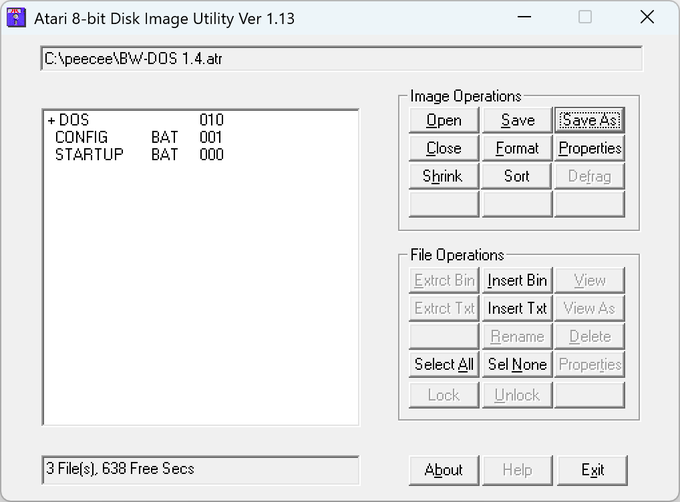
Atr*Util's primary interface is a simple dialog box that will
give you an image's file list on the left and an arsenal of
buttons on the right.
The following are the image operations currently supporteed:
Open - Opens an ATR or XFD image to view or extract files
from. Preliminary DCM support has now also been added.
Only Atari Dos, MyDos or compatable file systems are
displayed. Boot disks or other DOS disks may display an
error, garbage, or nothing. If an image is opened
successfully, the list box will be populated with a list of
files on the disk for which you can select. Multiple files
can be selected or unselected at will.
Save As - Puts up a dialog box and lets you save the image in
the desired format. Choices are Std Atr, Non Std Atr, Std Xfd,
Non Std XFD, or DCM. Note:DCM is NOT supported yey for saving.
You will not get the DCM or XFD types if the disk is not one
of the three standard image sizes. 720 sectors/128 bytes per sec,
1040 sectors/1280 bytes per sec, or 720 sectors/256 bytes per sec.
You will not get the Non Std ATR or Non Std XFD options if there
are 128 bytes per sector since the only incompatabily is with
256 bytes per sector disks.
Save - Currently same as Save As. Eventually it will save the
current image back to the same file and format it was loaded
from.
Close - Closes the current image -- returns the program to
its startup state.
Properties - Displays filename, number of sectors, sector
size, data size of the currently open image.
Format - (This option is only available if you have an image
currently open). This option will allow you to format an existing
image. Two choices are available for formatting: None, which
zeros out the entire image, or MyDos which zeros out the image
and sets up a MyDos file system. You can not change the attributes
such as sector count or sector size. If there are 720 or less
sectors the image should be Atari Dos Compatable. Formatting
Atari Dos 2.5 Enhanced Density disks is not supported. There
must be at least 369 sectors in the image to format it for Mydos.
Create - (This option is only available if there is not an image
currently open) Create a new blank image with parameters specified.
You must not currently have any image open in order to
create a new image. Upon clicking Create, a dialog box will
appear. You may select one of three "standard" size images,
or click custom and pick your own. If you choose to create
a custom image select the number of bytes per sector: 128 or
256 bytes, then select the number of sectors. This should
be between 3 and 65534 (yes, I know 65535 should be the max
but I have to fix something first). The values entered are
not verified yet, entering other values may do bad things.
Note: The image size to the right keeps you updated with the
number of bytes of data the image can hold (if it were a
real disk). You must select Save from the main screen to
actually save the file. You will be prompted with a file
dialog box for a name. You may mark the MyDos box to auto-
matically format the image so you may put files on it. To
make it Atari Dos compatable choose 128 byte sectors, 720
sectors on disk and MyDos. The image will then be compatable
with Atari Dos 2.0 or compatable Dos's. Formatting Dos 2.5
Enhanced Density is not supported.
There is also a box you can select now (KBoot). This will
create the smallest possible booting ATR for any atari executable
you choose. The file created must not need Dos, so it is most
suitable for game files. The file created is the same as created
by my MakeAtr Utility. When the image is booted a 'K' appears
on the screen as it loads. If the screen turns red and error
occured. If this occurs be sure that the original file actually
works when loaded from DOS before complaining. The original file
can be restored by extracting it back out of the image.
Sort - Will sort a Mydos image alphabetically from file. Will be
expaned to include Atari Dos soon. System files will eventually
be able to be excluded in the sort.
The following are the file operations currently available:
Extrct Bin/Extrct Txt - Will extract currently selected files
to a directory of your choosing. Extrct Bin will extract the
file as is, Extrct Txt will convert Atascii to CR-LF dos format.
It will also convert binary to a hex dump and Atari Basic (or
Turbo Basic XL) to text. After pressing the appropriate extract
button, a directory selection box will appear. You may type in or
select the directory of you choosing. Press the Extract
button on the screen will extract all selected file to that
directory. The directory defaults to the directory you last
extracted to. Atari Dos 2.0/2.5, MyDos, and KBOOT (bootable
images created by this program or MakeAtr) are supported.
Select All - Selects all files in the list. Currently the
list may appear to scroll as files are selected. This will
be fixed in the next version. It doesn't cause any
problems, but it doesn't look good.
Sel None - Unselects all files in the list.
View - This option will only be available if only one file
is selected. This option will display a file in notepad (or
if it is too large you will be prompted to open in wordpad).
Files ending in ".BAS" will be detokenized and displayed as
text. File with extensions such as "EXE", "COM", "BIN",
etc. will display as a hex dump currently. Other files will
display as text. I hope to add more file types and
configuration later. Note: Inverse video is converted to
normal and control characters display as periods currently.
Hopefully other types can be added such as PIC converting to
BMP, MAC/65 detokenization, etc. Anyone got any code or an
ATASCII font?? Atari Dos 2.0/2.5, MyDos, and KBOOT (bootable
images created by this program or MakeAtr) are supported.
Delete - Delete selected files from an image. There is no
further prompting. If you mess up just reopen the image to
wipe out your changes.
Insert Bin/Insert Txt - Allows you to select files to add to
the disk image. Insert Bin will insert the file as is with no
changes. Insert Txt will convert CR's, LF's, and Tabs to ATASCII
format (should more characters be converted?). The program should
automatically adjust beween CR-LF, CR, or LF terminated files
although it has not been tested. You currently cannot insert files
into Dos 2.5 Enhanced Density images. If some files don't fit
it will continue trying to fit any remaining files that will.
This should make it easy to fill all the space on a disk. You
will receive a warning if some didn't fit or you exceeded the
64 file limit. I will hopefully make it more informative in the
future. Notes: Long file names are not gracefully handled and files
are not inserted in the order in which they are selected when
multiple files are selected.
Properties - Give file name, size in sectors, size in bytes and in
the future hopefully the file type.
Rename - Allow you to rename files in an image. Only one file can
be selected for this option to be selectable.
Lck/Unlk - Will lock or unlock atari files. Not implemented.
Last but not least
About - Displays current version, copyright info, and the
date the program was last updated.
Help - Not implemented.
Exit - Exit the program, duh! You will be warned if changes
haven't been saved. (I might have forgot to do that for Create)
Features (bugs?)
You more than likely will not be able to save an image if the
original file is write protected. Need to polish this a little more.
Note: Image Properties will also show the image write protected if the
APE bit to indicate write protect is set. Atr*Util should let you modify
the image is this case in the future.
If an error occurs when opening an image sometimes buttons are improperly
enabled.
Probably some more things I have forgotten about.