
What is the SIO?
The SIO stands for the "Serial Input/Output". It is a data transfer protocol used by the Atari 8-bit machines to communicate with a printer, disk drive, modem etc. via the SIO connector. These transfers are controlled by the POKEY chip.
Is this something like RS-232?
Basically, yes. It is possible to connect the SIO port to a RS-232 port, the only one you should change is the voltage: the SIO uses TTL-signals. Serial transfer parameters usually are as follows:
- 1 start bit
- 1 stop bit
- 8 data bits
- no parity control
- 19200 bits per second
The last parameter may vary, as for example so called "cassette recorders" (who can remember such data storage?) use 600 baud; also some disk drives may operate at 38400, 52000, 67000, 96000 or 125000 baud.
SIO connector
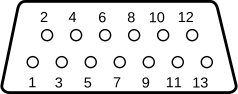
| Pin | Description |
|---|---|
| 1 | Clock IN |
| 2 | Clock OUT |
| 3 | Data IN |
| 4 | GND |
| 5 | Data OUT |
| 6 | GND |
| 7 | Command |
| 8 | Motor Control |
| 9 | Proceed |
| 10 | +5V / Ready |
| 11 | Audio IN |
| 12 | +12V (1200XL & 400/800) |
| 13 | Interrupt |
Command Frame
| Offset | Name | Description |
|---|---|---|
| $00 | DDEVIC | Device ID |
| $01 | DCOMND | Command |
| $02 | DAUX1 | Auxiliary byte 1 |
| $03 | DAUX2 | Auxiliary byte 2 |
| $04 | Checksum of previous bytes |
Communication
First, the computer sets the COMMAND line at the SIO connector.
Then sends the command block (4 bytes + checksum)
Then waits for a response (1 byte without a checksum):
- $41 (A) = Acknowledge, the command is valid and will be executed.
- $4E (N) = Negative, the command is invalid.
If the device responds "N", the transfer is aborted.
Otherwise ("A") the data block is transferred with the checksum.
Now the computer waits for a final acknowledge (1 B without a checksum):
- $43 (C) = Complete, operation completed successfully.
- $45 (E) = an Error has occurred.
Device IDs
| Floppy | Printer | Cassette | RS232 | ||||
|---|---|---|---|---|---|---|---|
| ID | Device | ID | Device | ID | Device | ID | Device |
| $31 | D1: | $40 | P1: | $60 | C: (dummy) | $50 | R1: |
| $32 | D2: | $41 | P2: | $51 | R2: | ||
| $33 | D3: | $42 | P3: | $52 | R3: | ||
| $34 | D4: | $43 | P4: | $53 | R4: | ||
| $35 | D5: | $44 | P5: | ||||
| $36 | D6: | $45 | P6: | ||||
| $37 | D7: | $46 | P7: | ||||
| $38 | D8: | $47 | P8: | ||||
| $39 | D9: | $48 | P9: |
Editor, Screen and Keyboard are not connected via SIO, hence you don't find entries here.
Cassette is a dummy. A tape recorder is an unintelligent device. It neither reads the command frame nor does it answer commands.
Sparta DOS 3.3x is said to support drives up to D15.
Commands
$20 - Format Auto
Speedy 1050: Format automatically, acts like $21, but computer doesn't have to wait 'till drive is ready
- AUX1: Config Byte 1 (?)
- AUX2: Config Byte 2 (?)
$21 - Format Drive
Single for 810 and stock 1050 or as defined by CMD $4F for upgraded drives (Speedy, Happy, HDI, Black Box, XF 551). Returns 128 bytes (SD) or 256 bytes (DD) after format. Format ok requires that the first two bytes are $FF. It is said to return bad sector list (never seen one).
- AUX1: n/a
- AUX2: n/a
$22 - Format Medium Density
Formats medium density on an Atari 1050. Format medium density cannot be achieved via PERCOM block settings!
- AUX1: n/a
- AUX2: n/a
$23 - Service
Atari 1050 Diagnostic Software uses this. Don't use it yourself, you may lose data.
- AUX1: n/a
- AUX2: n/a
$24 - Diagnostic
Atari 1050 Diagnostic Software uses this. Don't use it yourself, you may lose data.
- AUX1: n/a
- AUX2: n/a
$3F - Get High-speed-index
Returns a single byte:
| Device | Byte |
|---|---|
| Happy | $0A |
| US-Doubler | $0A |
| HDI | $0A |
| Speedy | $09 |
| Toms 720 | $06 (?) |
- AUX1: n/a
- AUX2: n/a
XF551 & Indus have bit 7 of command byte set for highspeed data frame.
| Drive | Speed | Cmd | Data |
|---|---|---|---|
| All devices | 19120 | $28 | $28 |
| XF551 High Speed | 39000 | $28 | $10 |
| US-Doubler & compatibles (Happy?) | 52000 | $0A | $0A |
| Speedy | 57000 | $09 | $09 |
| IndusGT Syncromesh | 72000 | $28 | $06 |
$41 - Add/Remove Command
Speedy 1050, HDI: Sends 3 bytes to drive. First byte is new command. Bytes 2 and 3 are the address in Speeder RAM. Add/remove command to/from internal command table. Existing command will be overwritten. Use address of $0000 to erase command.
- AUX1: n/a
- AUX2: n/a
$44 - Configure Drive
- AUX1: Configuration Byte
- AUX2: n/a
| Bit | Description |
|---|---|
| 0 | ERROR beep ON |
| 1 | Unused |
| 2 | Unused |
| 3 | Don't stop drive motor upon $51 cmd |
| 4 | Don't write VTOC and Bootsector upon $20 cmd |
| 5 | Format without verify |
| 6 | HEX display |
| 7 | Allow ERROR display |
$48 - Happy Command
Set motor off delay from 0 to 6.5 seconds. Default is 3 seconds.
- AUX1: $01
- AUX2: $00-$FF
Set new drive number You should check before if this potential drive already exists using STATUS
- AUX1: $02
- AUX2: $Bx
Clears all Software settings. Reads disk density. - AUX1: $03 - AUX2: $00
Software write protect ON
- AUX1: $18
- AUX2: $10
Software write protect OFF
- AUX1: $18
- AUX2: $08
Drive uses command $50 instead of $57
- AUX1: $20
- AUX2: $00
Set RAM protect. Drive does not use RAM for track buffers or something like this.
- AUX1: $60
- AUX2: $60
Set RAM free. Allows RAM usage for track buffering.
- AUX1: $00
- AUX2: $80
Set unhappy mode. Disable all speeder functions but DD.
- AUX1: $E0
- AUX2: $E0
$4B - Slow/Fast Config
- AUX1: Configuration Byte
- AUX2: n/a
| Bit | Description |
|---|---|
| 0 | Read sector slow |
| 1 | Write sector slow |
| 2 | Verify OFF |
| 3 | Drive slow |
| 4 | Unused |
| 5 | Unused |
| 6 | Read 1 track slow (resets when track changes) |
| 7 | Read 1 disk slow (resets when disk is changed) |
$4C - Jump without Message
Speedy 1050: Drive jumps to program address in its memory.
- AUX1: Address LOW
- AUX2: Address HIGH
$4D - Jump with Message
Speedy 1050: Like $4C, but drive acknowledges command prior execution (sends COMPLETE).
- AUX1: Address LOW
- AUX2: Address HIGH
$4E - Read PERCOM Block
Happy, Speedy, F2000, HDI, XF551, BB: Reads 12 bytes from drive.
- AUX1: n/a
- AUX2: n/a
| Offset | Description |
|---|---|
| $00 | Number of tracks |
| $01 | Step rate (00=30ms 01=20ms 10=12ms 11=6ms) |
| $02 | Sectors per Track HIGH |
| $03 | Sectors per Track LOW |
| $04 | Number of sides decreased by one |
| $05 | Record Method (0=FM single, 4=MFM double, 6=1.2M) |
| $06 | Bytes per Sector HIGH |
| $07 | Bytes per Sector LOW |
| $08 | Drive online ($FF or $40 for XF551) |
| $09 | Unused (Serial rate control?) |
| $0A | Unused |
| $0B | Unused |
For harddrives or ramdisks, track equals one and byte 2 and 3 are no. of sectors per disk (minus 1 on MIO board and Black Box) I suggest ramdisks return $00 for tracks
$4F - Write PERCOM Block
Same definition as in $4E. Send this command prior format ($21) to choose how to format a disk.
- AUX1: n/a
- AUX2: n/a
$50 - Write Sector
Sends 128 or 256 (or more) bytes to drive and writes sector w/o verify.
- AUX1: Sector LOW
- AUX2: Sector HIGH
$51 - Quit
Speedy 1050, HDI: Writes buffered data to disk and stops motor
- AUX1: n/a
- AUX2: n/a
$52 - Read Sector
Reads 128 or 256 (or more) bytes from drive.
- AUX1: Sector LOW
- AUX2: Sector HIGH
$53 - Get Status
Gets status information from intelligent peripheral
- AUX1: n/a
- AUX2: n/a
Reads 4 bytes:
| Offset | bit | Description |
|---|---|---|
| $00 | Drive status: | |
| 0 | Command frame error | |
| 1 | Checksum error (Data frame error). | |
| 2 | Write Error (Operation error/FDC error) | |
| 3 | Write protected | |
| 4 | Motor is ON | |
| 5 | Sector size (0=$80 1=$100) | |
| 6 | Unused | |
| 7 | Medium Density (MFM & $80 byte mode) | |
| $01 | Inverted, contains WD2793 Status Register. Depends on command used prior status. | |
| 0 | Controller busy | |
| 1 | Data Request or Index (DRQ) | |
| 2 | Data lost or track 0 | |
| 3 | CRC Error | |
| 4 | Record not found | |
| 5 | Record Type or Head Loaded | |
| 6 | Write Protected (Always false upon read) | |
| 7 | Not Ready (Disk Removed) | |
| $02 | Timeout for format ($E0) - Time the drive will need to format a disk | |
| $03 | Copy of WD2793 Master status register |
$54 - Read Memory | Get Drive variables
HDI: Reads 256 bytes of memory. In case you try to read the HDI hardware registers ($4000 to $4FFF) it may crash.
- AUX1: Address LOW
- AUX2: Address HIGH
Super Archiver: Sends 00-7F variables.
- AUX1: ?
- AUX2: ?
$55 - Motor ON
- AUX1: ?
- AUX2: ?
$56 - Verify Sector
- AUX1: ?
- AUX2: ?
$57 - Write Sector with Verify
Writes Sector to drive, drive rereads the sector, but doesn't send the reread sector back to the computer
- AUX1: Sector LOW
- AUX2: Sector HIGH
$60 - Write Track
Speedy 1050: Writes multiple sectors. Amount of data equals # sectors by sector size.
- AUX1: First Sector
- AUX2: Last Sector
$62 - Read Track
Speedy 1050: Reads multiple sectors. Amount of data equals # sectors by sector size.
- AUX1: First Sector
- AUX2: Last Sector
$66 - Format Disk with Special Sector-Skew
US-Doubler, HDI: Sends 128 byte of data to the floppy. The first 12 bytes are the Percom block. The next bytes (as many as there are sectors per track) are the sector numbers in the order you would like them to be formatted. Filler bytes must be zeroes.
Example for SSSD:

28 02 00 12 00 00 00 80 FF 00 00 00 12 10 0E 0C
0A 08 06 04 02 11 0F 0D 0B 09 07 05 03 01 00 00
00 00 00 00 00 00 00 00 00 00 00 00 00 00 00 00
00 00 00 00 00 00 00 00 00 00 00 00 00 00 00 00
00 00 00 00 00 00 00 00 00 00 00 00 00 00 00 00
00 00 00 00 00 00 00 00 00 00 00 00 00 00 00 00
00 00 00 00 00 00 00 00 00 00 00 00 00 00 00 00
00 00 00 00 00 00 00 00 00 00 00 00 00 00 00 00
- AUX1: n/a
- AUX2: n/a
$68 - Get SIO Length
Speedy 1050, HDI: Returns 2 byte value matching the length of the SIO routine which you can read from the drive using command $69.
- AUX1: n/a
- AUX2: n/a
$69 - Get SIO Routine
Speedy 1050, HDI: Reads high speed SIO routine from Speedy 1050 relocated to any address you wish. You can use this routine on your XL/XE to perform highspeed I/O. Use this routine instead of $E459.
LDA $300    ; wanna talk to disk?
AND #$F0
CMP #$30
BEQ NEWSIO  ; Yes
JMP $E459   ; No
NEWSIO ...
- AUX1: Relocate Address LOW
- AUX2: Relocate Address HIGH
$74 - Return prepared buffer
Super-Archiver: Returns buffer as set by previous $75 command(?)
- AUX1: ?
- AUX2: ?
$75 - Upload & execute code
Super-Archiver: Writes code to $1000 and executes it.
- AUX1: ?
- AUX2: ?